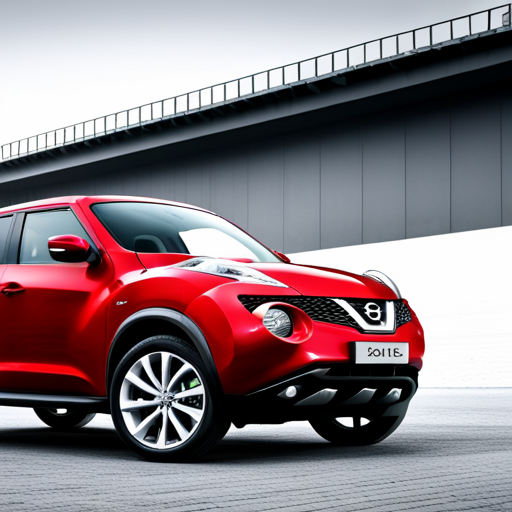
Get your Nissan radio code from the serial number you can find on the unit screen or on its label: Touch & Connect, Daewoo, Clarion and Blaupunkt radios.
Works with the Nissan radios that ask for a code: Touch & Connect navigation, Daewoo, Clarion and Blaupunkt units.
LockedEntering the codeUnlocked
Radio Code:Radio Code:FM10000X----X----X----XMHz · TP
Price shown before you pay · no account, no survey
Half of the codes arrive within three minutes
Step 1 · Find the serial
Where is the Nissan radio serial number?
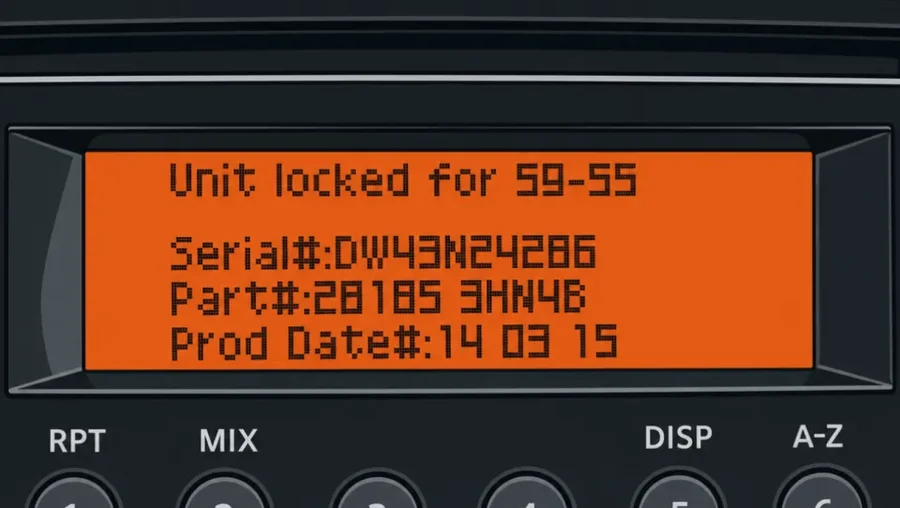
It depends on the radio. Touch & Connect and Daewoo units show it on the screen once they are locked; Clarion and Blaupunkt units carry it on a label on the side of the case. Pick yours: two things to do at the radio, then the boxes to type what it shows.
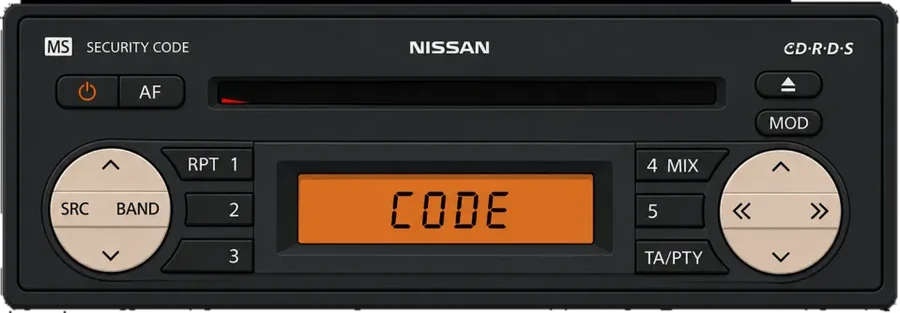
Not sure? Switch the ignition on: a locked Nissan radio shows one of these four screens. Something else on yours? Send us a photo of it in the chat.
Nothing to remove
Find Navigation unlock info
At the radio
3×
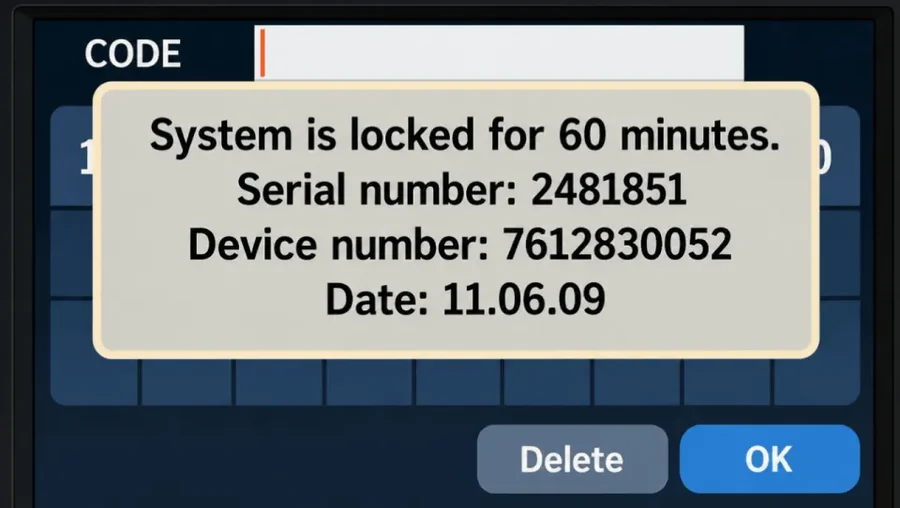
Enter any wrong code three timesOn the keypad tap 1234 and OK, three times in a row. To display this information on the navigation screen, we must lock it on purpose.
60min
The system gets locked for 60 minutesWhile it is locked, it displays the data we are looking for. The lock does no harm: by the time the hour is over you have your code.
On this page
Nothing to remove
Find Daewoo radio unlock info
At the radio
3×
Enter the code 1234 three timesPress button 1 once, 2 twice, 3 three times and 4 four times, then hold 6. Do that three times: to view this information, we lock the unit on purpose.
60min
The unit locks for 60 minutesDon't worry; the lock lasts only 60 minutes while your unlock information is displayed on the screen.
On this page
The radio comes out
Find your Clarion unit's serial number
At the radio
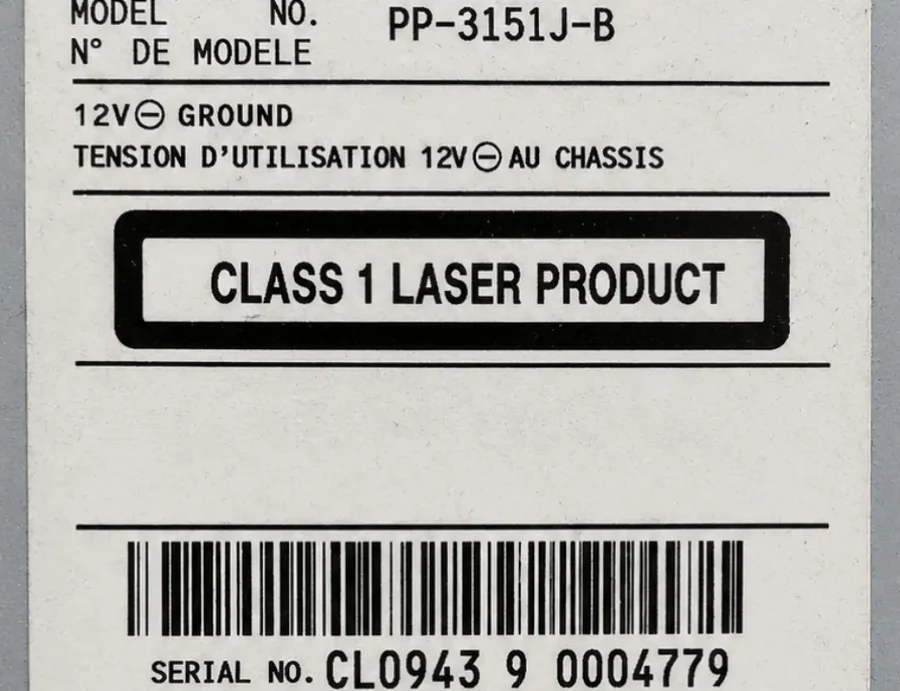
Extract the radioRadio models manufactured by Clarion do not display the unlock information on the screen. Extract the radio from the centre of the console; the wiring stays connected.
Look at the label on the sideFind the SERIAL NO. under the barcode and the MODEL NO. at the top. Take a photo of the label before the radio goes back in.
SerialModel no.
On this page
The radio comes out
Find your Blaupunkt unit's serial number
At the radio
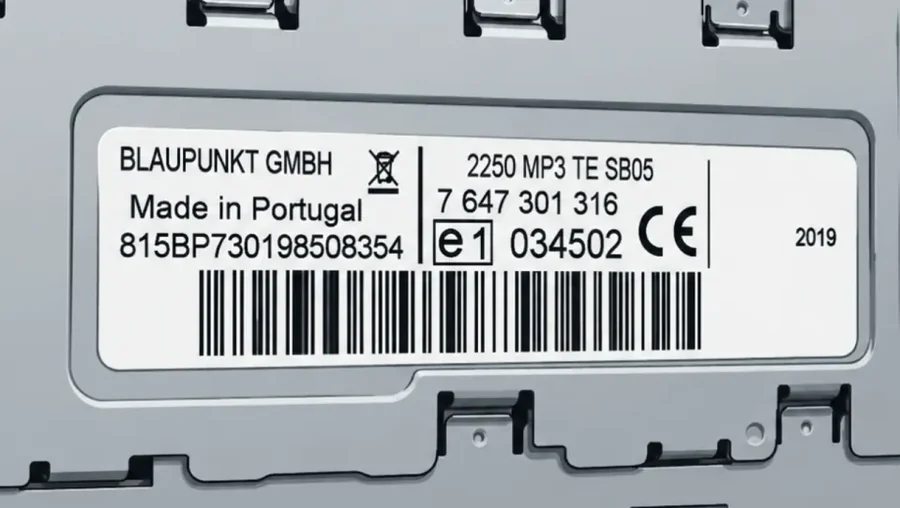
Extract the radioThis radio model is usually mounted on Nissan Micra cars. Carefully extract the radio; the wiring stays connected.
Look at the sticker on the sideThe serial number for this unit manufactured by Blaupunkt is located above the bar code, and it has this format: BP + 12 characters. Example: BP5387 7 1222974. Take a photo of the sticker before the radio goes back in.
Serial
On this page
Step 3 · Enter the code
Enter Nissan radio code
Now that you have the 4-digit activation code for your radio, it is time to enter it. Pick the unit that looks like yours and follow the numbers marked on it.
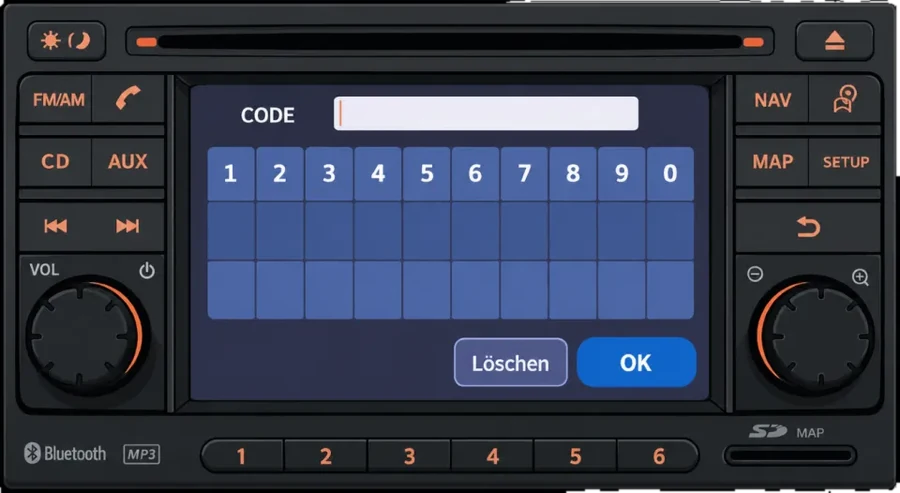
Switch the unit on. The CODE keypad comes up by itself. If it says the system is locked, wait for the 60 minutes to pass with the ignition on.
Tap the four digits of your code on the screen.
Tap OK. The radio and the map come back.
123
buttons 1 to 4
Daewoo radios
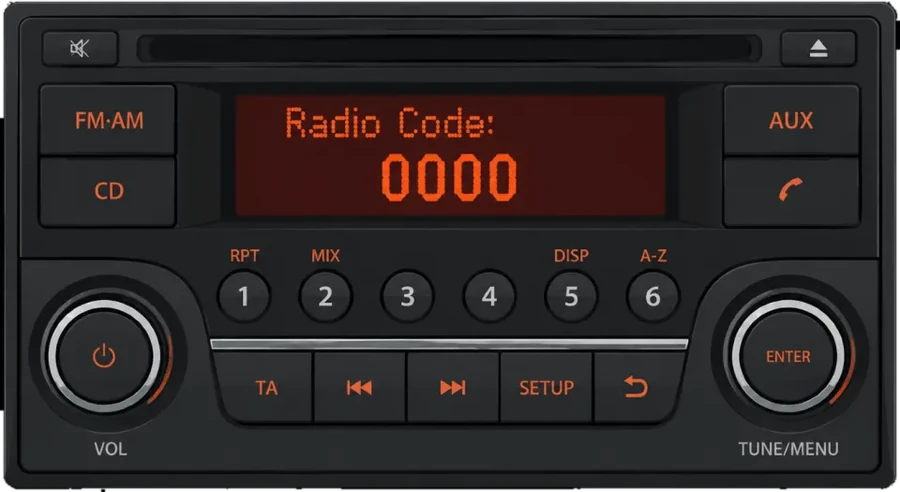
Switch the radio on. The display reads Radio Code: 0000.
Press button 1 as many times as necessary to enter the first digit of the code: for a 9, press it nine times. Do the same with buttons 234 for the rest of the code.
Check the code on the display, then hold button 6 until the radio plays.
1223
buttons 1 to 4
Clarion radios
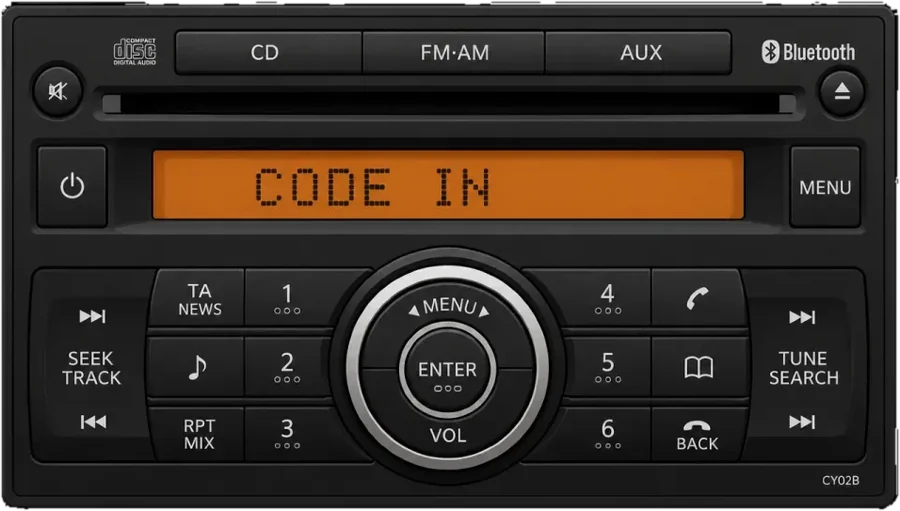
Switch the radio on. The display reads CODE IN.
Press button 1 as many times as necessary to enter the first digit of the code: for a 9, press it nine times. Do the same with buttons 234 for the rest of the code.
Check the code on the display, then confirm with the upper end of the SEEK TRACK key on the left ▶︎▶︎|.
1223
buttons 1 to 4
Blaupunkt radios
Switch the radio on. The display reads CODE.
Press button 1 as many times as necessary to enter the first digit of the code: for a 9, press it nine times. Do the same with buttons 234 for the rest of the code.
Check the code on the display, then confirm with the up arrow ▲︎ of the round key on the right.
The confirmation button is different depending on the stereo model. If the one marked here does nothing on your unit, try 6, FF, TA, the up arrow or ▶︎▶︎, or send us a photo of the radio in the chat.
Three tries
Radio locked: Contact your Nissan dealer
Nissan radios allow a wrong code to be entered up to three times before limiting access.
This lock disappears after 60 minutes with the radio on, after which you can enter a code again.
If you keep entering wrong codes, after 3 or 4 temporary lockouts the audio unit is permanently locked. You will see "Contact your Nissan dealership" on the screen. To resolve the problem, as the message says, you must visit an authorized dealer.
The first lock does no harm. It is the same lock we ask you to cause on Touch & Connect and Daewoo units to read their details: one lockout, then the right code.
If something goes wrong
Radio code not working
Don't worry if the code you received does not work. In 99% of the cases, this happens due to an error in providing your radio data.
Open the chat and upload a picture where your radio info can be seen. Our team will analyze the situation and generate another code for you, depending on the case.
Tampered with radios (code changed). In a few cases, we have encountered LCN (Touch & Connect) type units with the production date in a strange format, for example "-3.3-.09" or "30-39-30". This indicates that the stereo has been opened and the system software has been tampered with; most likely the original factory code has been changed. The only way to get the code out is to read it from the memory chip, so you should consult a professional radio decoder.
You get your money back in the very few instances in which the code cannot work, such as a radio whose code has been changed.
Before you pay anyone
Nissan radio code for free
Sometimes. Three places are worth ten minutes of looking.
The radio code card. It came with the car, in the wallet with the owner's manual: four digits, often with the radio's serial beside them. Some dealers wrote the code inside the manual.
Navigations and radios manufactured by Daewoo. The unlocking process is very complicated, so getting the code at no cost is impossible.
Nothing there? A Nissan code costs from £11.99 in the UK. You see the price before you decide, and the money comes back if the code fails. Get the code ↑
Not a fault
Why is my Nissan asking for code?
All Nissan car radios are protected against theft by a locking system triggered when the radio is disconnected from the car's power system. This often happens when:
The battery is replaced or runs flat
The car is repaired
The unit moves to another car
There is no way around it. This system is inconvenient for owners who do not have the card with the radio code: the moment you disconnect the power, you need the code to use your audio system again.
Fortunately, it is straightforward nowadays, as you can get this code online from the serial number.
Why us
Find your Nissan radio code
If your Nissan car radio is locked and requires the activation code, you have come to the right place. Get the activation code by providing the serial number of your radio: half of the codes arrive in less than three minutes. We assure you of complete satisfaction. If you have any questions about the unlocking process, do not hesitate to contact us via chat.
Three good reasons why you should choose us
1Expert human support. In case of any incident, speak directly to a person capable of resolving it on the spot. Do not hesitate to write to us, whatever the reason.
2Fast unlocking. We hate waiting as much as you do, so most codes are worked out automatically. Enter the details of your radio, make the payment, and the code shows on screen, ready to use.
3Don't waste your time. Get your code from the comfort of your car with your mobile phone. You save the trip to a Nissan dealership and pay up to four times less than a dealer typically charges.
Proof
Use a trusted service
We can only ask you to trust us with proof, and that's why we have worked hard on our Trustpilot profile.
Every user receives an invitation to leave a review of their experience, whether positive or negative.
Trustpilot is recognized and trusted because manipulating the results (such as adding fake reviews) is almost impossible.
Whatever Nissan model you own, rest assured we can provide the code for it. The code follows the radio, not the car: what matters is the serial of the unit.
Short answers to what drivers ask most. If yours is not here, ask us: a person answers.
20,837
Nissan radios unlocked
99.2%
of codes work
Written and kept up to date by the RadioUnlock team. Updated November 2026.
How much does a Nissan radio code cost, and how fast is it?
A Nissan code costs from £11.99 in the UK. The price is set per country and is shown, together with the delivery time, as soon as the serial is identified, before you pay. Most codes are worked out automatically: half arrive within three minutes of payment and eight in ten within the hour. The rest are looked up by hand, and nine in ten orders are done within five hours. The order page refreshes on its own and the code also arrives by email. You pay by card, Apple Pay or Google Pay, and if the code does not unlock your radio you get the money back.
Where do I find the serial number of my Nissan radio?
Touch & Connect navigation and Daewoo radios show it on the screen: enter any wrong code three times and the lock message lists the serial and the other details. Clarion and Blaupunkt radios carry it on a label on the side of the case, so the unit has to come out of the console. The section at the top of this page shows each one.
Why do I have to lock my radio to read the serial?
Because that is the only moment a Touch & Connect or a Daewoo unit shows its details. Three wrong codes lock it for 60 minutes and the lock message lists them. The lock does no harm: by the time it is over you have your code.
What do I type for a Touch & Connect or a Daewoo radio?
For Touch & Connect: the serial number (seven digits), then the device number and the date, exactly as the lock message shows them. For Daewoo: Serial#, then Part# and Prod Date#. The form asks for the two extra lines as soon as it recognises the serial.
My radio says "Contact your Nissan dealer". Can you still help?
Not with a code. That message means the unit was locked several times in a row and is now permanently locked; only an authorized dealer can release it. It is why a code should be entered carefully, from the email, not from memory.
The code does not work. What now?
In 99% of the cases one character of the radio details was wrong. Open the chat and upload a picture of the lock screen or the label; we check it and send another code where one exists. If the radio has been tampered with and its code changed, you get your money back.
Can I get a Nissan radio code for free?
Only if the code is still with the car: on the radio code card kept with the owner's manual, or written inside the manual by a dealer. For some Clarion units a bypass trick works. Otherwise no: there is no free way for Touch & Connect and Daewoo units, and a code from us costs from £11.99 in the UK, shown before you pay.
Does this work for the Micra, Qashqai, Juke, Note and NV200?
Yes. The code follows the radio, not the model. What matters is the serial of the unit itself; we do not need the year or the model of the car.
How do I enter the code?
On Touch & Connect, tap the four digits and OK. On the radios with buttons, press button 1 until the first digit shows, then buttons 2, 3 and 4 for the others, and confirm: hold 6 on Daewoo, the seek key on Clarion, the up arrow on Blaupunkt. The section above shows each radio with the keys marked.
Reviews left on this site for this page. Our Trustpilot score, in the footer, is separate and covers every brand.
The latest 34 reviews
EEmma fuller23 Nov 20261
This service is shocking, the code they sent through doesn't work! I've been waiting over 16 hours for a response!! 2 separate chats later and still no response or working code. Paid money for a service that just isn't cutting it. Will never use this company again. Absolutely useless
MMichael mitchell18 Nov 20261
The code does not work
MMarco Amador10 Nov 20265
It worked perfectly.
NNorman Chavula9 Nov 20265
It is the easiest and quickest way to get back the code at an affordable cost
ÖÖmer Küçükoğlu6 Nov 20265
Radio code good work
GGergely28 Oct 20265
The code arrived a few minutes later, and it works perfectly. Thank you very much!
MMichelle23 Oct 20261
incorrect code sent, tried online chat for no response after over an hour when it states typical replies are within a few minutes.
not holding much hope after seeing a few negative reviews
Reply from RadioUnlock14 Nov 2026
We're sorry for both the code issue and the chat delay. Incorrect codes are usually due to a serial number typo, and we can quickly generate a new one with the correct details. Please try our chat again—if the music doesn't play, it doesn't cost you anything. We'll make this right.
CCoke22 Oct 20265
Everything super OK! Works great, good job!
AAjdin8 Oct 20261
Dosent work its is a scam
Reply from RadioUnlock15 Nov 2026
We're sorry to hear about your experience. If the code didn't work, you're entitled to a full refund – if the music doesn't play, it doesn't cost you anything. Please contact us through the app chat with your serial number, and we'll resolve this for you right away.
CCars hub Ltd26 Sep 20265
2 minutes got code
DDkm3 Sep 20265
quick and easy, works right away with no issues
SStef22 Jul 20265
Worked first time, worth the £5
RRafal1 Jul 20265
code working properly
KKELECHI ELUWA24 Jun 20261
I already have this code which is not working anymore. I paid for this code in 2023 and have used it several times and it's not unlocking the radio anymore.
RRobin12 Jun 20264
It worked but charging 10 Euros for it is pretty fkd up????
SSali9 Jun 20265
Money well spent
LLukas6 Jun 20265
Worked without issues. Took 5min to arrive on sat. Well done A+++
EErica Frost1 Jun 20265
Very pleased with this service. Quick and efficient.
LLewis Hunt26 May 20265
Got locked out of my stereo by an awful mechanic! Found this website and Followed the step by step on the website and got my stereo up and running again. Even when I entered the information wrong they contact me straight away and sort me out with the code. Amazing service and price.
JJosh30 Apr 20265
2017 Micra radio reset and Nissan dealer wanted £45 for the code. Thought I would give this a try for £14 and am very happy with the quick service and a working code.
LLowe25 Apr 20264
Worked perfectly
RRyan22 Apr 20261
Incorrect code showing
DDave Knox 18 Mar 20261
no code given after taking payment? feels like a scam tbh will warn all my friends in the trade to stay away, disgusting
AArão Rubens 7 Mar 20265
I didn't get the code and I paid 257 rands
NNick5 Mar 20265
Radio code worked first time a brilliant website. Nissan was going to charge me 250 quid.
ВВалерий3 Mar 20265
Обращаюсь не первый раз. Все четко и поделу. Коды работают.
ZZoltán27 Feb 20265
minden rendben, gyors, működik
GGarry fellows23 Feb 20265
still waiting for code
BBruce 16 Feb 20261
Website says 15-30 minutes I needed a code fast. They wouldn't reply to me I sent several messages. Still no code
LLauren11 Feb 20265
Do not use!!! Code never recieved no way to communicate!
JJamie Lelliott8 Feb 20265
I haven't received radio code
MMartin4 Feb 20265
Sent request during night and few hours later, Radio works perfect.
EEdi24 Jan 20265
PP2787HB0074254
HH.T19 Jan 20261
I paid for the radio code but still haven't received a response. Scammer.